
Backstory
When my internet goes down, I’m essentially unable to work from one moment to the next. Stranded in all sorts of places: video calls, tools, mail, collaboration. Nothing would work for me in such a moment. The tasks that can be finished without internet are usually dealt with pretty quickly. I can of course tether my notebook to a phone and carry on for a while, but then I can’t reach any of the other resources sitting around in my network. And we’re talking about things as simple as my printer. I’ve come to realise that nothing meaningfully improves on the usability of paper and pencil when it comes to reconciling lists.1 All those VMs with testbeds and playgrounds. My fileserver with 20 years of collected papers and the accumulated flotsam and jetsam2 of a professional life, the part that isn’t subject to my employer’s document rules. There are so many small things I use over the course of a day that depend on my not prying my work machines out of the home network and hanging them off my phone’s personal hotspot instead.
And really, I don’t want to have to do anything at all. I want to simply still have a route to the net. I want traffic switched over to another line the moment my primary connection buckles, and switched back automatically once the kink has been straightened out. What I want is basically what a lot of my customers have. Redundancy. I don’t need the whole thing to be seamless; it’s perfectly fine if I have to restart a session for it. But that should be the extent of it.
Nor is it a requirement that I be able to reach my network from the outside. When I travel, I travel light. Guaranteeing that access would be hard with a mobile backup connection anyway, since carrier grade NAT tends to be in the way.
The previous solution
My solution up to now was simply having two independent fixed-line internet providers in the house. I had one connection via VDSL and a second via TV cable, which the previous owners of my house had in fact routed in from different sides of the building.
And that is precisely what once saved my backside. In talks I like to use the example of the excavator that cuts through an important cable. I always considered it a myth. I’d heard stories about this fabled excavator. But I’d never been the victim of one. Not unlike the plank of timber on the motorway that German radio traffic reports have warned me about so many times without my ever having seen one.3
But: I did have it here, that internet-severing excavator, when the cycle path outside my door was being resurfaced. On a day when I had to give a talk over Zoom. It did take quite a while until the repair was done. A few days later, walking the dog past the site, I spotted a spot on the exposed cable that looked suspiciously like a splice.
Thanks to the second line, all of this turned into a fairly inconsequential event.
Going forward
Quite a bit is about to change about my internet connection. I’m being fibred up. I’m getting fibre from Telekom, and I went for 1 GBit/s. Given the requirements described above, I also opted for a connection with an elevated service level. But eight hours of outage are still eight hours. That’s a full working day if somebody, full of joy and fortified by coffee and a “Frühstücksmettbrötchen”, picks up a spade at eight in the morning and kills the fibre cable. Because from what I saw when they laid the cable up to my door: it isn’t buried deep.
Since the new fibre connection is quite expensive enough on its own, I no longer wanted a second fixed internet connection in the house at the same time. So I decided on a backup line over 5G, making use of an “already-there” contract situation.
Ubiquiti Unifi 5G Max
So what does this look like technically? I bought the Ubiquiti Unifi 5G Max. Essentially a Unifi-manageable router with a 5G modem in it.
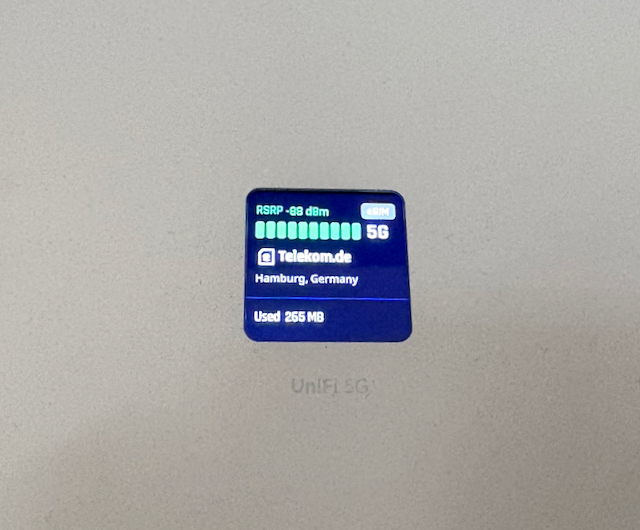
As you may have read in my other blog posts, I’ve developed an enormous fondness for things that simply work. Without my having to do much for it. My network is therefore built entirely out of Ubiquiti components. Which is why I went with a device from the Unifi range for 5G as well. Because these days my appetite for spending hours tinkering4 with something that already exists as a finished product is fairly limited.5
In the current setup everything runs through a Unifi Cloud Gateway. As part of the move to fibre that will be replaced by a Unifi Cloud Gateway Fiber. I chose that one primarily because it supports 10 GBit/s. That puts the entire backbone in my house on 10 GBit/s. But I’ll report on that in a separate article.
Lessons learned
Perhaps a few of my findings from putting the thing into service:
- I’m using the indoor variant. There’s an outdoor version that has no display and whose antennas apparently have considerably more directional gain. Given how close the base station is, that didn’t seem necessary to me.
- The device needs power. So far, so obvious. But there’s no power supply in the box. There’s no power connector either. I couldn’t find a USB-C port on it either. It draws its power via Power over Ethernet. Either you have a suitable switch (I do) or you additionally need a PoE injector. Anyone with neither is left standing there looking rather foolish until the supplier they distrust the least has procured one or the other.6
- Commissioning went very quickly. The device was offered up for adoption promptly and was part of central management right after. The update to the latest version then takes a little while. Once you’ve activated the eSIM, most of the rest happens on its own. It simply works. That’s how I wanted it. It hooks itself in as an additional internet connection. The entire configuration required for automatic failover later on also happens automatically. The mechanism here isn’t switching from one router port to another, after all. It’s more complex. The Unifi 5G Max is a standalone box somewhere in the network. So the whole commissioning process suited my goal of not wanting to tinker rather nicely. That I nevertheless had to do some debugging was down to a few legacy items in my configuration.
- Speaking of the eSIM: if you want to use an eSIM via QR code, you need the Unifi mobile app. It makes activating the eSIM quite easy. The device supports two physical SIMs (one physical SIM if you use the eSIM functionality). I’ll probably make use of that in the long run. Once the fibre connection is live, my internet runs over Telekom. At the moment there’s a Telekom SIM in the Unifi 5G Max as an eSIM. For the absolute emergency I’ll probably put a Vodafone prepaid card in there, so that a large-scale Telekom outage doesn’t hit me quite so hard. That would then be integrated as a third WAN connection.
- You can also specify per network whether it should use the HA functionality for internet access. I’ve excluded the appliances network, for instance. It’s meant to keep notebooks and phones supplied with internet, not to serve as a complete internet connection for everything. In that situation I don’t care whether the televisions and all the assorted small-device clutter can reach the net.
- Given the throughput I measured (more on that later) it would actually be possible to run everything over the backup. But that isn’t the point of the solution.
- What I now have in use is a sort of “red sockets / white sockets” model that I’ve seen in companies more than once. Red sockets were backed by the UPS, white ones weren’t. At the moment I only let certain networks switch over automatically. The rest just sits in the dark for a few hours until the fault is cleared. There are no new episodes of The Pitt at the moment anyway. I can manage a day without HBO Max.
- There’s a commercial and a technical reason for this split into red and white sockets. The commercial reason: my current mobile tariff with Telekom is unlimited in terms of data volume. So I could in principle run all traffic over that line indefinitely. But I mentioned that I’ll probably get a Vodafone SIM as well, to bypass the Telekom network entirely, and that I’d then have to buy additional data on it in the event of an outage. There I won’t have the luxury of no limit. The technical reason is fairly simple too: when I’m bandwidth-constrained (and I am, switching to 5G compared to my line), I want that bandwidth occupied only by systems that need it. Not switching over all the appliances sheds a fair amount of load right there.
- Now to the remaining debugging: if you have policy routing enabled, turn off “Kill Switch”. for the rule, assuming you don’t need it for security reasons. Policy routing lets you force traffic in a direction other than the default. For example, routing the whole “blahfasel_us” network through a VPN provider you’ve configured so that the endpoint sits in the USA. The “Kill Switch” option then ensures that, in case the VPN isn’t available, everything doesn’t go out unencrypted via the normal route because it was switched over automatically. I’ve since deleted the policies entirely, as they were a leftover from the way I used to integrate my two internet connections.
In practice
Let’s put some numbers on the table. I measure 150 MBit/s on the downlink. On the uplink it’s 105 MBit/s. I find the 105 MBit/s surprisingly high; I’m used to a pronounced asymmetry here. The measuring point is the 5G Max itself. Ping time is around 30 ms. For my use case that’s more than sufficient.
The speed here is clearly limited by the mobile network. If I’m reading the data on the nearest base station correctly, that’s roughly what you can expect from the connection.
How long does the switchover take? I’d like to show it with a ping. The test case here was powering off the cable modem.
64 bytes from 159.195.145.249: icmp_seq=24 ttl=55 time=24.725 ms
Request timeout for icmp_seq 25
64 bytes from 159.195.145.249: icmp_seq=26 ttl=51 time=27.036 ms
The changed TTL, incidentally, also makes it very easy to see that the packets are now taking a different path. After the link via the cable modem was restored, the old value is back:
64 bytes from 159.195.145.249: icmp_seq=0 ttl=55 time=30.953 ms
So the answer is: pretty quickly. You’ll certainly notice it in your applications, since all traffic is now coming from a different IP. How well the applications cope with that depends on their design.
Conclusion
Securing availability with the 5G Max inside the Unifi world worked quickly and without trouble. The speed sits at the upper end of what the mobile network makes available to me. There is of course the entry cost of acquiring a component in this world. I paid around 420 euros for my 5G Max.7 The cost of the additional line depends heavily on your mobile contract situation. I got mine quite cheaply as an additional card that shares the “unlimited” property with the main card. For you it may look different. But there’s always the option of using a prepaid card and topping it up with a day flat rate when needed, so that at least no provisioning costs arise there.
A suggestion for improvement
Having said all that, I do of course have a suggestion for improving the product. The 5G Max runs constantly for a scenario that may well never occur across the entire lifetime of the product. And yet the device keeps sipping away at my electricity. The management interface reports 5.09 W for the port. That’s roughly 45 kWh a year, so somewhere between 15 and 18 euros depending on your tariff. Not much in itself. It’s more the fundamental question of whether a device you may never need has to run continuously.
Now, the device is powered via a switch. In central management I can turn power on that port on and off. I’d love an option that would let me trade a slower response time for saved electricity. Namely, that power on the port the 5G Max is attached to is only switched on once the primary internet connection fails. The device would then have to boot first, of course, but it would only draw power for that period. Once the primary internet has been stable again for an hour, power on the port could be switched off again.
Naturally that costs you an important piece of information: if I switch the device off, I don’t know whether it will work when I switch it back on — possibly not for many months, or even years. All it takes is for the provider to have deactivated the SIM for inactivity. You also want the device to be kept up to date with the latest software version. To that end it would be useful to boot the device once a week, check for updates and test whether the connection still works.
I’m currently wondering whether something like this could be implemented independently via an API. You could then dream up wilder features as well: immediately available backup during the day, for instance, while at night power has to be switched on first. Or bringing the port up as soon as certain clients become active on the network. I’ll report on how the idea progresses. And yes, I know: there it is again, tinkering with a problem. But working with the Unifi API is probably a justifying gain in insight.
-
Yes, I know that I’m putting a fair number of dead trees to very brief use before shredding the sheet of paper, but that’s what works best for me. And no, I don’t feed the data into any LLM to have it compared. It isn’t my data. ↩
-
I’m on holiday at the moment and have set myself the goal of reading as much of the second volume of The Lord of the Rings as I can. Tolkien certainly knew how to express himself. And I somehow like the phrase “flotsam and jetsam”8 so much that I wanted to use it just once. Peter Gabriel’s last B-sides album was called the same thing, incidentally. ↩
-
I have, however, once seen a swan on the motorway. And if the swan exists, then the plank of timber probably does too. ↩
-
All right, to be precise about it: I still enjoy tinkering with problems. But my appetite for it is measured by the potential gain in insight and the possible reusability of what I learn. ↩
-
And at the moment I have enough monetary units at my disposal that the choice between “build it yourself”, “cheap hardware” and “something proper” isn’t dictated by financial constraints, within reason. That may also have to do with the fact that my toy budget is currently going unspent, since I simply have no desire to put that much money on the vendors table for SSDs and DRAM, and I no longer chase the latest graphics cards. The flight simulator runs immersively enough on my current graphics card. I suspect this rethink won’t be limited to me, and that it will come back to bite the big hardware manufacturers. ↩
-
The computer shop that used to be nearby is now a mosque. And I find that regrettable. Not because a religion is being practised there — there’s a Kingdom Hall two houses along, and a very nearby church bell calls me to the stove every lunchtime. As far as I’m concerned a synagogue would be welcome here too. The Jehovah’s Witnesses now have their car park on an undeveloped plot. But rather because I can no longer simply walk across the road when I need a spare part. Although they probably wouldn’t have had a PoE injector in stock either. ↩
-
Ubiquiti do have a device called the Unifi 5G Backup. It’s meant purely to back up another line, whereas the 5G Max can also replace the line. Whether that’s a technical limit or product positioning I haven’t checked. The 5G Backup is more limited than the 5G Max in other respects too. It costs 89 € net at Ubiquiti. But it was practically never in stock there and permanently showed as “sold out”. Yes, right up until shortly after I bought my Unifi 5G Max. Of course it was. ↩
-
A chapter title in “The Lord of the Rings – The Two Towers”. ↩