
(originally published on 15.03.2019, reviewed/rewritten on 30.03.2025, tested on Oracle Solaris 11.4 SRU 79)
With Oracle Solaris 11.4 you are now able to give routes a name. Working with a named route makes it easier to work with them in case you want to list or manipulate them. Let’s create such a named route by adding the -name option to the route command. Everything else is as usual.
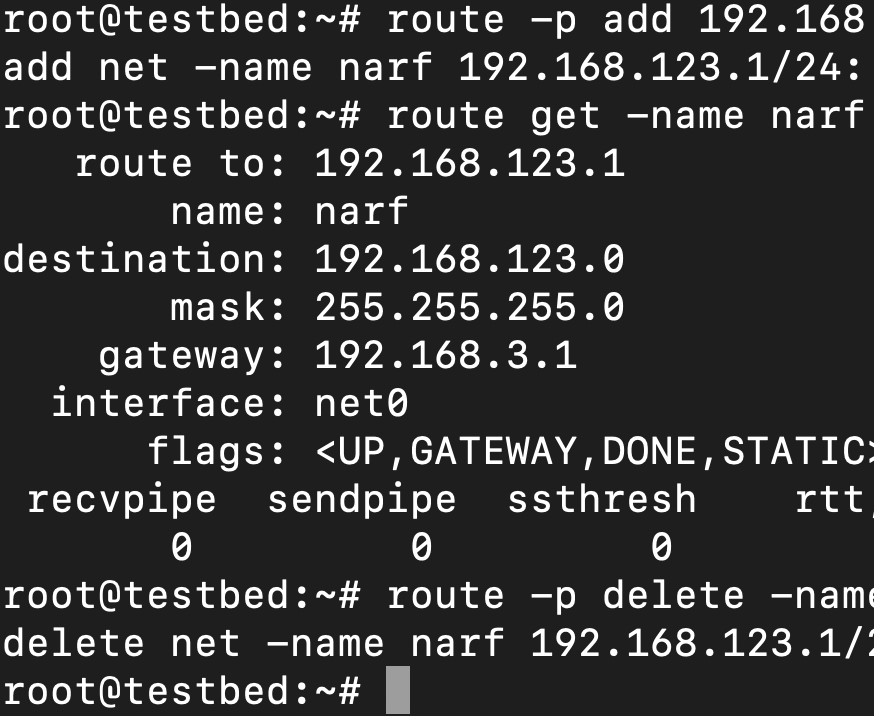
root@testbed:~# route -p add 192.168.123.0/24 192.168.122.1 -name narf
add net -name narf 192.168.123.0/24: gateway 192.168.122.1
Now we can work with this route by using the name narf. For example to view the details.
root@testbed:~# route get -name narf
   route to: 192.168.123.0
       name: narf
destination: 192.168.123.0
       mask: 255.255.255.0
    gateway: 192.168.122.1
  interface: net0
      flags: <UP,GATEWAY,DONE,STATIC>
 recvpipe  sendpipe  ssthresh    rtt,ms rttvar,ms  hopcount      mtu     expire
0         0         0         0         0         0      1500         0
You can use it as well to delete the route:
root@testbed:~# route -p delete -name narf
delete net -name narf 192.168.123.0/24: gateway 192.168.122.1
With a consistent naming scheme on all your systems you can definitely make your life easier when you work with routes.
Mastodon · 3 comments

Joerg Moellenkamp
@c0t0d0s0
Routes with names - https://www.c0t0d0s0.org/blog/republicationwherethestreetshaveaname.html
www.c0t0d0s0.org
Named routes – c0t0d0s0.org
Where the streets have no^H^Ha name.
2
4
4

Eckes :mastodon:
@eckes@zusammenkunft.net
@c0t0d0s0 thats neat, also like the get output. Does it Store it in a /etc/networks like file?
1
0
0

Bruce D Porter
@ytc1@mastodon.sdf.org
↩ @eckes@zusammenkunft.net
@eckes @c0t0d0s0 it's Solaris, bound be be XML :-)
0
0
0
Bruce D Porter
@ytc1@mastodon.sdf.org
@c0t0d0s0 ooh, I like that.
0
0
0
4 toots from 3 people in this thread